

A high-quality gaming mouse can significantly improve accuracy, reaction time, and overall gaming performance. Whether you enjoy FPS, MOBA, or casual games, features like DPI sensitivity, sensor precision, ergonomic comfort, and programmable buttons play a vital role in delivering a better gaming experience.
Finding the Best Gaming Mouse Under 2000 in India (2026) is easier than ever, thanks to brands like Redragon, ASUS, HyperX, Corsair, and Razer. These manufacturers now offer premium features, durable builds, customizable controls, and reliable sensors at budget-friendly prices.
In this guide, we compare the top options to help you choose the perfect gaming mouse for your needs and budget.
Table of Contents
1: Top 5 Best Gaming Mouse Under 2000
1.1: Redragon M810 Pro Wireless Gaming Mouse

Key Specifications
| Specification | Details |
|---|---|
| Connectivity | Wired & Wireless |
| DPI | Up to 10,000 DPI |
| Buttons | 8 Programmable Macro Buttons |
| Battery Life | Up to 45 Hours |
| Lighting | RGB Backlit |
| Special Feature | Rapid Fire Key |
| Compatibility | PC, Mac, Laptop |
Who Should Buy It?
The Redragon M810 Pro is an excellent choice for gamers seeking a feature-rich wireless gaming mouse under a budget. Its 10,000 DPI sensor, programmable macro buttons, and Rapid Fire function make it ideal for FPS, MMO, and competitive gaming. The dual connectivity and long battery life also suit users who need flexibility for both gaming and productivity.
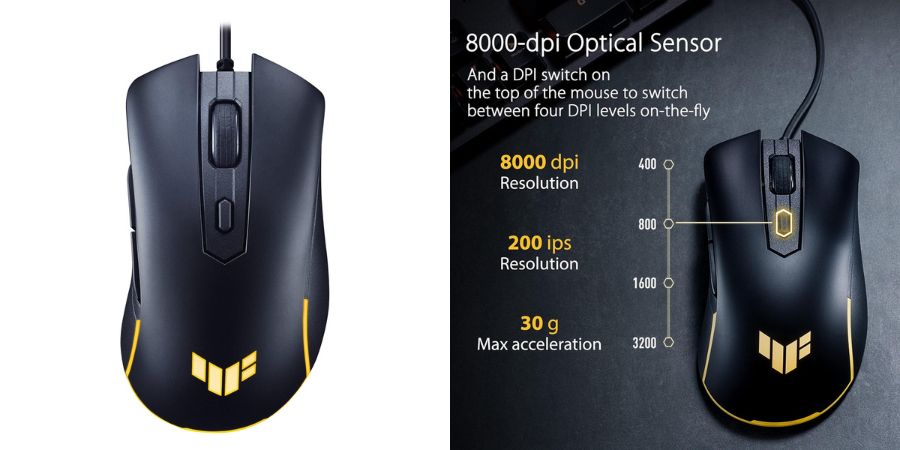
1.2: ASUS TUF Gaming M3 Gen II Gaming Mouse
Key Specifications
| Specification | Details |
|---|---|
| Sensor | 8,000 DPI Optical Sensor |
| Weight | 59g Lightweight Design |
| Connectivity | Wired USB |
| Buttons | 6 Programmable Buttons |
| Protection | IP56 Dust & Water Resistance |
| Feet | 100% PTFE (Teflon) Mouse Feet |
| Durability | Antibacterial Guard Coating |
Who Should Buy It?
The ASUS TUF Gaming M3 Gen II is a great option for competitive gamers seeking speed, precision, and durability. Its ultra-lightweight 59g design enables quick movements, while the 8K DPI sensor ensures accurate tracking in FPS and esports titles. With IP56 protection, programmable buttons, and smooth PTFE feet, it offers reliable performance for gamers who want a durable, high-value wired gaming mouse in 2026.
1.3: HyperX Pulsefire Core RGB USB Gaming Mouse

Key Specifications
| Specification | Details |
|---|---|
| Sensor | Pixart 3327 Optical Sensor |
| DPI | Up to 6,200 DPI |
| Weight | 87g |
| Buttons | 7 Programmable Buttons |
| Polling Rate | 1,000Hz |
| Switch Durability | 20 Million Clicks |
| Lighting | Customizable RGB |
| Warranty | 24 Months |
Who Should Buy It?
The HyperX Pulsefire Core is a solid gaming mouse for beginners and budget-conscious gamers who want reliable performance without overspending. Its Pixart sensor delivers accurate tracking, while the 1,000Hz polling rate ensures responsive gameplay. With seven programmable buttons, durable switches, and customizable RGB lighting, it is well-suited for FPS, MOBA, and casual gaming enthusiasts looking for a dependable wired gaming mouse in 2026.
1.4: Corsair Katar Pro Ultra-Light Optical USB Gaming Mouse

Key Specifications
| Specification | Details |
|---|---|
| Sensor | Optical Gaming Sensor |
| DPI | Up to 12,400 DPI |
| Connectivity | Wired USB |
| Weight | Ultra-Light Design (Approx. 69g) |
| Buttons | 6 Programmable Buttons |
| Lighting | RGB Backlit LED |
| Tracking | High-Precision Optical Tracking |
| Software | CORSAIR iCUE Support |
Who Should Buy It?
The Corsair Katar Pro is an excellent choice for FPS and esports gamers who prioritize speed, accuracy, and lightweight comfort. Its 12,400 DPI optical sensor delivers precise tracking, while the ultra-light design helps reduce fatigue during long gaming sessions. With programmable buttons, RGB lighting, and iCUE customization support, it offers outstanding value for gamers seeking a reliable wired gaming mouse under a budget in 2026.
1.5: Razer DeathAdder Essential Wired Gaming Mouse

Key Specifications
| Specification | Details |
|---|---|
| Sensor | Optical Gaming Sensor |
| DPI | Up to 6,400 DPI |
| Connectivity | Wired USB |
| Buttons | 5 Programmable Buttons |
| Lighting | Single-Color Green LED |
| Design | Ergonomic Right-Handed Shape |
| Switch Durability | Gaming-Grade Mechanical Switches |
| Compatibility | Windows PC & Laptop |
Who Should Buy It?
The Razer DeathAdder Essential is perfect for gamers who value comfort, reliability, and proven performance. Its ergonomic design fits naturally in the hand, making it ideal for extended gaming sessions. The 6,400 DPI optical sensor provides accurate tracking for FPS, MOBA, and casual gaming, while the durable build ensures long-term dependability. It is an excellent entry-level gaming mouse for players seeking trusted Razer quality at an affordable price in 2026.
2: Comparison Table
| Gaming Mouse | DPI | Buttons | Weight | Connectivity | Best For |
|---|---|---|---|---|---|
| Redragon M810 Pro | 10000 DPI | 8 Macro | Wireless/Wired | Dual Mode | MMO & Multi-purpose Gaming |
| ASUS TUF Gaming M3 Gen II | 8000 DPI | 6 | 59g | Wired | FPS Gamers |
| HyperX Pulsefire Core | 6200 DPI | 7 | 87g | Wired | RGB Enthusiasts |
| Corsair Katar Pro | 12400 DPI | 6 | 69g | Wired | Competitive Gaming |
| Razer DeathAdder Essential | 6400 DPI | 5 | 96g | Wired | Comfort & Reliability |
3: How to Choose the Best Gaming Mouse Under 2000
Choosing the Best Gaming Mouse Under 2000 starts with an accurate optical sensor for reliable tracking. Look for a DPI range of 3,200–10,000 depending on FPS, MOBA, or casual gaming needs.
Lightweight mice suit fast-paced gameplay, while heavier models offer extra control. Wired mice provide lower latency, whereas wireless models add convenience.
Programmable buttons improve productivity and gaming efficiency. Select a shape that matches your palm, claw, or fingertip grip. Prioritize durable switches, quality mouse feet, and a sturdy cable over RGB lighting alone.
4: Best Gaming Mouse Under 2000: Our Recommendations
- Best Overall: Corsair Katar Pro – Excellent balance of performance, precision, and lightweight comfort.
- Best Wireless Option: Redragon M810 Pro – Feature-packed wireless gaming mouse with programmable buttons and long battery life.
- Best Lightweight Mouse: ASUS TUF Gaming M3 Gen II – Ultra-light design with durable IP56 protection.
- Best RGB Mouse: HyperX Pulsefire Core – Customizable RGB lighting and reliable gaming performance.
- Best Ergonomic Choice: Razer DeathAdder Essential – Comfortable ergonomic shape with dependable tracking, making it one of the best gaming mouse under 2000 options for everyday gamers.
5: Frequently Asked Questions (FAQs)
Q1. Which is the best gaming mouse under 2000 in India?
The Corsair Katar Pro is the best overall choice, offering excellent accuracy, lightweight design, and great value.
Q2. Is a wireless gaming mouse good for competitive gaming?
Yes. The Redragon M810 Pro delivers responsive wireless performance suitable for most competitive gamers.
Q3. What DPI is ideal for gaming?
A DPI range of 800–3200 is ideal for FPS games, while higher DPI settings suit MOBA and productivity tasks.
Q4. Which gaming mouse offers the best RGB lighting?
The HyperX Pulsefire Core provides vibrant RGB customization and software control.
Q5. Which gaming mouse is best for FPS games?
The ASUS TUF Gaming M3 Gen II stands out with its lightweight design and precise sensor.
Q6. Are programmable buttons useful for gaming?
Yes, they allow quick access to macros, commands, and shortcuts, improving gameplay efficiency.
Q7. Which gaming mouse has the best build quality under 2000?
The Razer DeathAdder Essential offers excellent durability, ergonomic comfort, and long-term reliability.
6: Conclusion
The Best Gaming Mouse Under 2000 in India (2026) offers excellent value without compromising performance. The Redragon M810 Pro stands out for wireless convenience; the ASUS TUF Gaming M3 Gen II excels in lightweight gaming; HyperX Pulsefire Core delivers impressive RGB customization; Corsair Katar Pro offers the best overall balance, and Razer DeathAdder Essential remains the top ergonomic choice.
Before buying, consider sensor accuracy, DPI range, weight, connectivity, comfort, and button customization. Choose a mouse that matches your gaming style and budget. Check the latest prices and exclusive deals through our affiliate links to get the best value on your next gaming mouse purchase. PCS